How I'd Design a Shared AKS Cluster for Multiple Products
At Vendavo, the goal was to modernize our infrastructure. For our VPP and EPP products, that meant breaking them into microservices and moving them off of VMs and onto AKS. When more than one product is heading to Kubernetes, one of the first questions you hit is whether each product gets its own cluster or they share one.
When every product team gets its own Kubernetes cluster, it feels fine at first. Then you count them. Ten products means ten clusters to upgrade, patch, monitor, and pay for, and most of them sit mostly idle. A shared cluster lets one platform team run the hard parts once, while product teams focus on shipping their apps.
The catch is that sharing only works if teams can't step on each other. Here is how I would set one up on AKS.
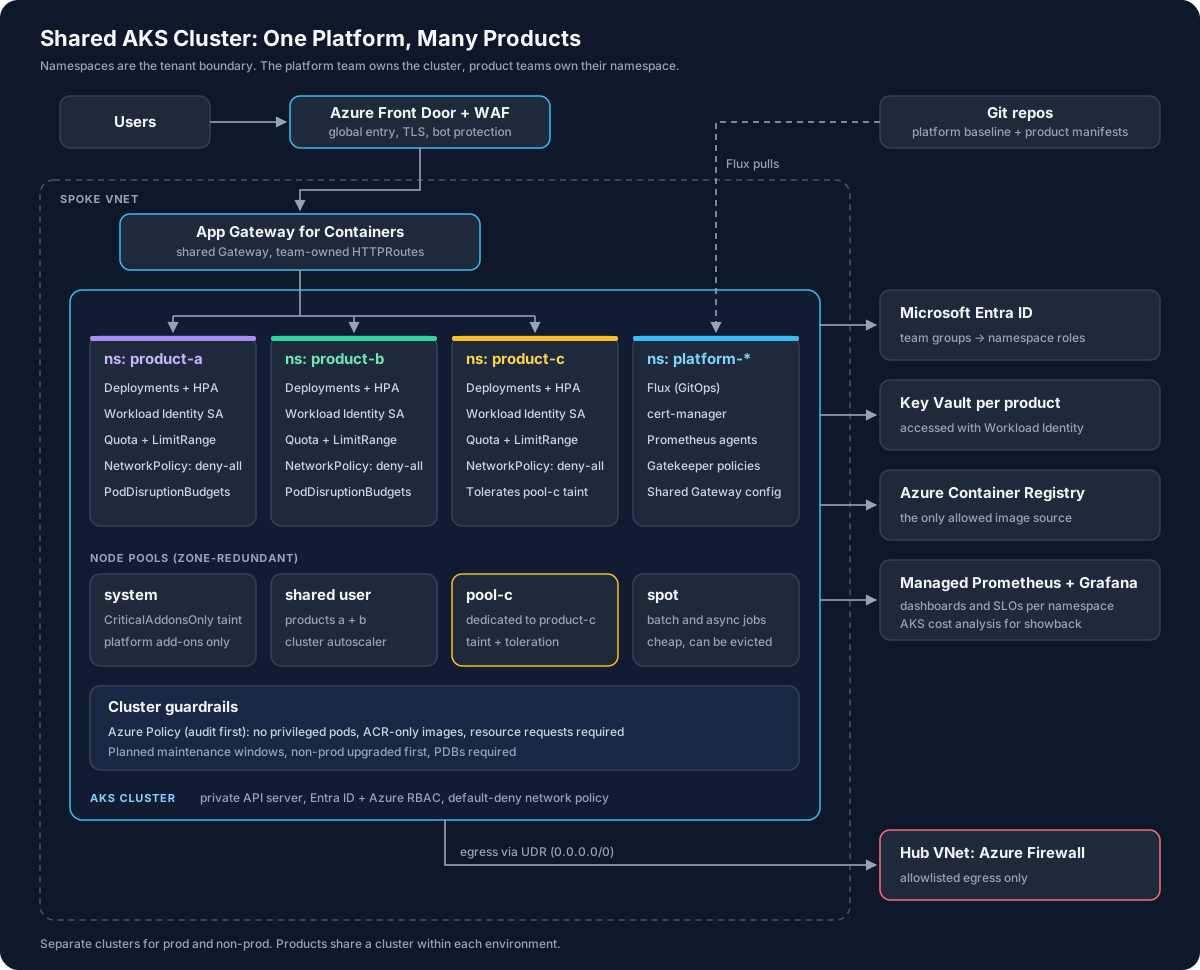
1. Decide What Gets Shared
I would not share a cluster between prod and non-prod. Prod gets its own cluster and non-prod gets its own cluster. That way a bad change in dev can never touch customers.
Inside each environment, products share. I would only give a product its own cluster if:
- It has different compliance rules. If one product falls under PCI and the others don't, sharing pulls everything into the audit.
- It runs code you don't trust, like code uploaded by customers. Namespaces are not a strong enough wall for that.
- It can't keep up with upgrades. If one product is stuck on an old Kubernetes version, it holds everyone else back.
If none of those apply, share.
2. Give Every Product Its Own Namespace
A namespace is a folder inside the cluster. Each product gets one, and everything that team owns lives there: their apps, services, config, and routes. Everything outside their namespace belongs to the platform team.
The important part is that every namespace starts with the same setup, created from a template instead of by hand:
- A limit on how much CPU and memory the product can use
- A network rule that blocks all traffic by default
- An identity the product's apps use to reach Azure
- Access for that team's Entra ID group, and only to their namespace
- Labels like
productandteam, so costs and alerts go to the right people
Adding a new product should be a pull request against that template, not a ticket that sits in someone's queue. It's the same idea I wrote about in my post on collective ownership.
3. Lock Down Access and Secrets
Connect the cluster to Entra ID and use Azure RBAC to control who can do what. Then you can give a team's group access to their namespace only, and you review that access in the same place as the rest of your Azure permissions. I'd also turn off the local admin account so nobody passes around a shared admin login.
For apps, use Workload Identity. Each product's apps get their own Azure identity, and that identity can only read that product's Key Vault. Product A can't read Product B's secrets, even if someone copies the wrong config file.
4. Keep the Network Simple and Closed
A few settings do most of the work:
- Private control plane. The Kubernetes API isn't reachable from the internet.
- Block by default. Every product namespace starts with a rule that blocks all traffic in and out. Teams then allow only what they need, like traffic from the load balancer and calls to their own database.
- Send outbound traffic through a firewall. All traffic leaving the cluster goes through Azure Firewall, so you can see and control what each app talks to.
The block-by-default rule is short:
apiVersion: networking.k8s.io/v1
kind: NetworkPolicy
metadata:
  name: default-deny
  namespace: product-a
spec:
  podSelector: {}
  policyTypes:
    - Ingress
    - Egress
One thing that trips everyone up: add a rule that allows DNS, or nothing in the namespace can look up a hostname.
For incoming traffic, I like the Gateway API. The platform team owns one shared gateway, and each product team adds its own routes from its own namespace. Teams can ship a new URL without needing access to anything outside their area. On Azure, Application Gateway for Containers handles this, with Front Door in front of it.
5. Stop One Product From Hurting the Others
Let's be honest, the biggest risk in a shared cluster usually isn't security. It's one app with a memory leak or a traffic spike eating resources everyone else needs.
Set limits per namespace. A quota caps what the whole product can use, and a LimitRange gives default values to any container that forgets to set them:
apiVersion: v1
kind: ResourceQuota
metadata:
  name: compute
  namespace: product-a
spec:
  hard:
    requests.cpu: "20"
    requests.memory: 40Gi
    limits.memory: 60Gi
    pods: "150"
---
apiVersion: v1
kind: LimitRange
metadata:
  name: defaults
  namespace: product-a
spec:
  limits:
    - type: Container
      defaultRequest:
        cpu: 100m
        memory: 128Mi
      default:
        memory: 512Mi
I set a default memory limit but no CPU limit. CPU limits slow apps down in ways that are hard to spot, and the quota already caps the total.
Split up your node pools. A node pool is a group of VMs that run your apps. I would use a few:
- System pool for the cluster's own tools, like DNS. Product apps aren't allowed here, so if one goes wrong, the basics keep working.
- Shared pool where most products run, with autoscaling turned on.
- Dedicated pool for a product with special needs, like lots of memory.
- Spot pool for batch jobs that are fine being stopped and restarted. Spot VMs are much cheaper.
6. Plan for Upgrades
This is the part people underestimate. In a shared cluster, every upgrade affects every product, so it needs to be boring and predictable:
- Set maintenance windows so upgrades happen when you expect them, not in the middle of a launch.
- Upgrade non-prod first and let it run for a week before touching prod.
- Require disruption budgets. A PodDisruptionBudget tells Kubernetes how many copies of an app must stay up, so it doesn't take them all down at once while replacing nodes.
- For big jumps, build a new cluster. Stand up a fresh cluster from Terraform, move traffic over at Front Door, and retire the old one.
The Rest of the Platform
A few more pieces round it out, and each one could be its own post. Azure Policy blocks risky settings, like containers running with full host access. Turn new rules on in audit mode first so you don't break five teams at once. Flux deploys everything from Git, so nobody runs commands against prod by hand. Managed Prometheus and Grafana give each team dashboards for their own namespace. I walked through that setup in my AKS observability post. AKS cost analysis shows what each namespace costs, which tends to shrink oversized apps on its own.
Wrapping Up
A shared cluster isn't about cramming everything into one place. It's about the platform team owning the hard parts once, so product teams get a safe, predictable place to run their apps.
If you're going to start anywhere, start with the namespace template. Once adding a new product is a pull request that comes with limits, network rules, identity, and access already set up, most of the rest falls into place.